
How to Monitor ArtNet Using Free ArtNet Monitor Software

Updated: Jan 7
If you’re working with Art-Net and DMX-controlled lighting or fountain systems, being able to see live data on your network is essential for testing, troubleshooting, and verifying your setup. Art-Net is the widely used protocol for sending DMX512-A lighting control data over Ethernet networks.
One easy way to monitor this data is by using SyncD ArtNet Monitor, a free real-time Art-Net viewer and DMX monitoring tool available Windows and macOS for both that’s perfect for beginners and professionals alike.
🛠️ What Is SyncD ArtNet Monitor and learn how to monitor ArtNet?
SyncD ArtNet Monitor is a lightweight, user-friendly software that displays live Art-Net and DMX data from your network. With it, you can:
View real-time Art-Net traffic and universes
Monitor individual DMX channels for signal level changes
Detect communication issues or unexpected data behavior
Troubleshoot complex lighting or fountain control networks
And best of all — it’s 100% free to download and use.
📥 Step-by-Step: Monitor Art-Net With SyncD ArtNet Monitor
1. Download & Install
Go to the SyncD ArtNet Monitor page on and download the software for your system. SyncD ArtNet Monitor available as a free download for Windows and macOS.
Tip: Make sure your computer is on the same Ethernet network as the Art-Net devices you want to monitor.
2. Configure Network Settings
Art-Net works over standard Ethernet (UDP port 6454). Ensure:
Your PC’s IP is in the same subnet as your lighting/fountain controllers
Any firewall settings allow Art-Net (UDP 6454) traffic
Since Art-Net runs over Ethernet, wired connections deliver more reliable results during monitoring.
3. Open SyncD ArtNet Monitor
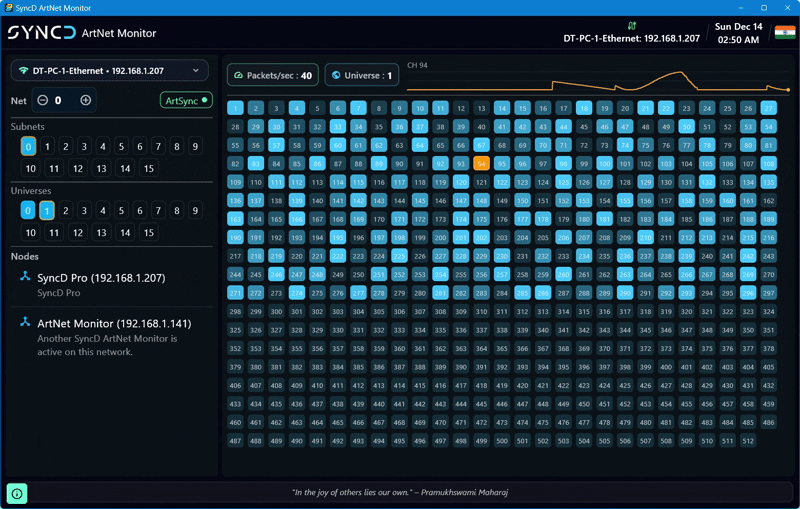
Launch the software. In its clean interface, you’ll see:
✔ Live Art-Net and DMX data streams
✔ List of detected universes
✔ Individual signal levels per DMX channel
✔ Network activity indicators
This view lets you instantly see what data your controllers are broadcasting on each universe — ideal when verifying cues or diagnosing issues.
4. Inspect DMX Channels
Click on a universe to see the live DMX channel values. This lets you:
Check if expected values are being transmitted
See unexpected spikes or values that could indicate programming errors
Analyze signal flow when multiple Art-Net nodes or consoles are active
This granular view is especially useful for complex synchronized systems, such as musical fountain installations or DMX lighting networks.
🔍 Why Use an Art-Net Monitor?
Monitoring Art-Net helps you:
✅ Verify that your network is transmitting correct DMX data
✅ Find issues before they affect your live show
✅ Understand universe and channel distribution
✅ Speed up setup and testing workflows
✅ Compatible with both Windows and macOS
Whether you’re troubleshooting a dancing fountain show, a theatrical lighting rig, or a multimedia installation, monitoring Art-Net can save you hours of guesswork.
Ready to get started?
👉 Download SyncD ArtNet Monitor for free and start viewing your network’s Art-Net activity in real time.


Comments